Web Development Fundamentals: A Beginner’s Guide to How the Web Works

HTML, CSS, JavaScript, browsers, servers, domains, hosting, APIs, databases, Git, frameworks — if you’re just starting out, the list of things people say you “need to know” can feel endless. The good news is that you don’t need to learn all of it at once, and most of it fits into a fairly small number of core ideas once you see how the pieces connect.
Before jumping into a framework like React or a backend technology like Node.js, it’s worth spending time on the fundamentals: how browsers and servers actually talk to each other, how a webpage gets built, and how the different layers of a modern web application fit together. That’s what this guide walks through — a broad map of the territory, with pointers to deeper posts on this site wherever a topic deserves its own full treatment.
The Three Broad Areas of Web Development
Most web development work falls into one of three categories. Frontend development is the part users actually see and interact with — everything rendered in the browser. Backend development is the part that runs on a server and that users never see directly — handling accounts, business logic, and talking to a database. Full-stack development means working across both layers, often alongside a specific combination like React on the frontend and Node.js with Express on the backend.
None of these are rigid categories with fixed technology lists — the “right” combination depends entirely on the project. But understanding which layer a given skill belongs to makes the rest of this guide much easier to follow.
How the Web Actually Works
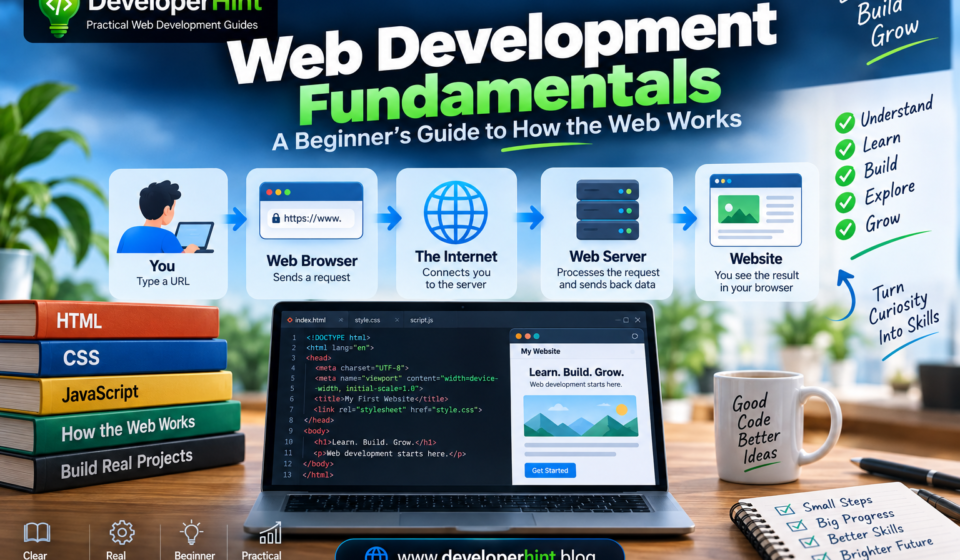
Before learning individual technologies, it helps to understand the basic journey a webpage takes. When you type a URL into your browser and hit enter, a simplified version of what happens looks like this: your browser looks up the domain through DNS, connects to the right server, receives the site’s files and data, and renders the finished page on your screen.
A few pieces are worth understanding individually. A web browser — Chrome, Firefox, Edge, Safari — is the software that requests and displays webpages. A URL (Uniform Resource Locator) like https://www.example.com/about breaks down into a protocol (https://), a domain (example.com), and a path (/about) that together tell the browser exactly what to ask for and how.
HTTP (Hypertext Transfer Protocol) is the protocol browsers and servers use to communicate — the browser sends a request like GET /about, and the server responds with a status and the requested content. HTTPS is that same protocol with encryption layered on through TLS, protecting the data traveling between browser and server from being read or tampered with along the way — essential for any site handling sensitive information.
A server is simply a computer or system that provides resources to other computers — storing files, running backend code, and returning responses. A domain name like developerhint.blog is the human-readable address people actually type, while DNS (Domain Name System) is what translates that readable name into the numerical IP address computers actually use to find each other.
HTML, CSS, and JavaScript: The Frontend Trio
Three technologies form the foundation of everything a user sees in a browser, and it helps to think of them by what each one is responsible for: HTML provides structure, CSS controls appearance, and JavaScript adds behavior.
HTML (HyperText Markup Language) describes what a piece of content is — a heading, a paragraph, a link:
<h1>Welcome to My Website</h1>
<p>I'm learning web development.</p>
<a href="/about">About Me</a>
It’s a markup language rather than a programming language, and one habit worth building early is semantic HTML — using elements like <header>, <main>, and <footer> that describe their purpose, rather than generic <div>s for everything. It improves accessibility, document structure, and how well search engines understand your page. If you want the fuller story on how HTML evolved into its modern form, our HTML vs HTML5 guide covers that in depth.
CSS (Cascading Style Sheets) controls how those elements look and where they sit on the page:
h1 {
    font-size: 3rem;
    margin-bottom: 1rem;
}
Every element on a page can be thought of as a box made up of content, padding, a border, and margin — understanding that box model early makes CSS layout issues far less mysterious. For arranging elements, Flexbox handles one-dimensional layouts (a row of navigation links, for example), while CSS Grid handles two-dimensional ones (a grid of cards). Learning those two layout systems well will take you a lot further than trying to memorize every CSS property that exists. Responsive design — making a site work well from phone to desktop — builds on top of all of this, combining flexible layouts, relative units, responsive images, and media queries rather than being just one single technique.
JavaScript adds behavior and interactivity:
const button = document.querySelector("button");

button.addEventListener("click", () => {
    alert("Hello!");
});
Central to this is the DOM (Document Object Model) — the browser’s live representation of your HTML that JavaScript can read and modify. Once you’re comfortable with core JavaScript concepts — variables (const and let), functions, arrays, objects, and events — you have everything needed to build genuinely interactive pages: form validation, menus, calculators, dashboards, and more.
Best for: anyone starting from zero — this trio is the right place to spend your first few months, before touching a framework of any kind.
What Happens on the Backend
The backend is the part of an application running on a server, invisible to the person using the site. It handles user accounts, authentication, database operations, business logic, and API requests. A login flow is a good example of the backend at work: you submit an email and password, the frontend sends that to the backend, the backend checks it against the database, and a response travels back telling the frontend whether to show a dashboard or an error.
Common backend languages include Node.js, Python, PHP, Java, C#, and Ruby — you don’t need to learn all of them, just one well enough to build with.
APIs, JSON, and Databases
An API (Application Programming Interface) is what lets the frontend and backend actually talk to each other. A weather app, for instance, might request data from an API and get back something like:
{
    "city": "Mogadishu",
    "temperature": 29,
    "condition": "Sunny"
}
That format is JSON (JavaScript Object Notation) — the standard structured-text format almost every API uses to exchange data. Behind the API sits a database, which stores the application’s actual information: users, posts, comments, products, orders, whatever the app needs to remember between visits. Popular systems include PostgreSQL, MySQL, MongoDB, and SQLite, each organizing data a little differently.
Most APIs you’ll encounter as a beginner are REST APIs, which organize themselves around resources and standard HTTP methods — GET to retrieve, POST to create, PUT or PATCH to update, DELETE to remove. Servers also communicate results through HTTP status codes: 200 for success, 404 when something isn’t found, 500 when the server itself hits an error. There’s also GraphQL, an alternative approach where the client specifies exactly which fields it wants back — if you want the full comparison, our REST API vs GraphQL guide covers when each one makes sense.
Seeing It All Connect
Here’s the complete picture in one example. A user clicks “Add Task” and types “Learn JavaScript.” The frontend sends that as a POST /api/tasks request. The backend validates it and saves it to the database. The database confirms the save, the backend sends a response back, and the frontend updates the screen to show the new task. That request-response loop — frontend to backend to database and back — is one of the single most important concepts in web development, because nearly everything else you’ll learn plugs into some version of it.
Tools You’ll Use Constantly: Git, GitHub, and npm
Git is a version control system that tracks changes to your code over time, letting you see what changed and roll back if something breaks. GitHub is a platform built around Git for hosting repositories, sharing code, and collaborating with other developers — the two aren’t the same thing, even though people often use the names interchangeably. A basic Git workflow looks like writing code, committing it locally, then pushing it to GitHub to share or back up.
If you’re working with JavaScript and Node.js, you’ll also run into npm constantly — the package manager used to install and manage the external code libraries your project depends on, along with running project scripts. There’s a related tool called npx for executing packages rather than installing them, and the distinction trips up a lot of beginners — our npm vs npx guide breaks that down in detail.
Frameworks and Libraries
Once your fundamentals are solid, you’ll start hearing about tools like React, Angular, Vue, Next.js, Laravel, and Django. These help developers build larger applications more efficiently, but they’re not a shortcut around the basics — learning React, for example, becomes far easier once you already understand JavaScript functions, objects, arrays, events, and asynchronous code. Rushing into a framework before that foundation is solid tends to just make everything feel harder than it needs to be.
You’ll also hear the word “library” used somewhat interchangeably with “framework.” Broadly, a library is reusable code your application calls when it needs it, while a framework provides more structure and dictates more of how your application is organized. The line between the two gets blurry in practice, and the terminology isn’t always used consistently — for a beginner, what matters more is understanding that both exist to help you avoid building everything from scratch. If you’re curious how several of these pieces combine into one popular full-stack combination, our MERN stack guide walks through MongoDB, Express, React, and Node.js working together.
Getting a Project in Front of Real Users
Building something on your own computer is only part of the process. Deployment means making your application available somewhere users can actually reach it, and web hosting provides the infrastructure that makes that possible — server resources, storage, networking, and often things like SSL certificates and domain configuration.
You’ll also hear sites described as static or dynamic. A static site serves fixed files — HTML, CSS, JavaScript, images — and can still be fully interactive, since JavaScript runs in the browser regardless; “static” describes how the content is served, not whether it can respond to user actions. A dynamic site generates or retrieves content based on things like user data, database records, or authentication state — a logged-in dashboard showing your own information is a classic example. Most real applications blend both approaches depending on the page.
Accessibility, Performance, and Security Aren’t Optional Extras
These three get treated as afterthoughts by a lot of beginners, but they’re worth building habits around early rather than bolting on later.
Accessibility means your site should be usable by as many people as reasonably possible, including people using assistive technology. Semantic HTML, labeled form fields, meaningful alt text, keyboard navigation, and sufficient color contrast all contribute — a real <button> element, for instance, comes with built-in keyboard and screen-reader behavior that a <div> styled to look like a button simply doesn’t have.
Performance is about more than a site technically working — it’s about loading quickly, responding instantly to interaction, and staying visually stable while it loads. Google measures this through Core Web Vitals, and if you want the full breakdown of what those metrics mean and how to improve them, we cover that in depth in our Core Web Vitals guide.
Security means developing the habit of never assuming user input is automatically safe — that mindset alone heads off a large share of common vulnerabilities. Two terms worth knowing early: authentication answers “who are you,” typically verified through something like an email and password, while authorization answers “what are you allowed to do” once your identity’s confirmed — a regular user might only view their own profile, while an admin can manage other users entirely.
What the Browser Is Actually Doing
It’s easy to think of the browser as a simple window that displays a page, but it’s doing considerably more than that behind the scenes: requesting resources, parsing your HTML into the DOM, parsing your CSS into a similar structure called the CSSOM, combining the two to calculate layout, painting pixels to the screen, and then continuously responding to whatever the user does next. Understanding that pipeline, even at a high level, becomes genuinely useful once you start caring about performance and why certain changes to a page are more expensive than others.
A Practical Way to Learn All of This
You don’t need to absorb everything in this guide at once, and trying to learn HTML, CSS, JavaScript, React, Node, Express, MongoDB, TypeScript, and half a dozen other tools simultaneously is one of the most common ways beginners burn out. Focus on one layer at a time instead: HTML and CSS first, then JavaScript, then building small projects, then APIs, and only after that, a framework or backend technology.
The most effective way to turn any of this from theory into an actual skill is building things — starting small and letting projects grow in difficulty as your comfort grows. If you want a structured list of project ideas that scale from a personal portfolio site all the way up to a full-stack application, we’ve laid out ten of them with what each one teaches in our beginner project ideas guide. And if you notice yourself watching tutorial after tutorial without building anything independently, that’s worth addressing directly — our guide to escaping tutorial hell covers exactly that pattern and how to break out of it.
A few habits are worth building alongside whatever you’re learning: get comfortable with your browser’s developer tools early, since inspecting HTML, CSS, console errors, and network requests is one of the most useful skills a frontend developer has. And don’t treat errors as proof you’re bad at this — an error message like Uncaught ReferenceError isn’t a verdict on your abilities, it’s information pointing you toward exactly what to fix next.
Wrapping Up
Underneath every framework, library, and tool you’ll eventually use, a small set of core ideas holds everything together: HTML structures content, CSS controls how it looks, JavaScript adds behavior, browsers request and render all of it, HTTP lets clients and servers talk, APIs connect different parts of an application, databases store the data, and Git tracks how your code changes over time.
You don’t need to learn the entire ecosystem today. Start with HTML, move to CSS, then JavaScript, build a few small projects, learn how APIs work, get comfortable with Git, and only then pick a framework or backend direction based on where you actually want to go. For developers, that foundation matters more than any single tool — frameworks and libraries will keep changing over the course of your career, but understanding how the web actually works underneath them is what lets you pick up the next one quickly instead of starting from scratch every time.
Discover more from Developer Hint
Subscribe to get the latest posts sent to your email.
Content Disclosure
This content was created with the assistance of AI tools and thoroughly reviewed, fact-checked, and refined by a human editor to ensure accuracy, clarity, and usefulness for readers.Advertisements