
Every website you’ve ever visited — this one included — has to live somewhere. The files that make up a website: the HTML, the CSS, the images, the database — all of it needs to sit on a computer that’s connected to the Internet around the clock, ready to serve those files to anyone who asks.
That’s what web hosting is. Not the most glamorous concept, but one of the most important decisions you’ll make when building a website. The right hosting affects how fast your site loads, how reliably it stays online, how well it handles traffic spikes, and ultimately how much your visitors trust it.
This guide covers everything you need to understand about web hosting before making that decision — what it is, how it works, what the different types mean, and how to figure out which one fits your situation.
What Is Web Hosting?
Web hosting is a service that provides the infrastructure for storing your website’s files and making them accessible on the Internet. When you sign up for a hosting plan, you’re renting space on a server — a powerful computer that stays online 24/7 and delivers your site’s files to visitors whenever they request them.
The connection between hosting and domain names is worth clarifying early, because beginners often confuse the two. A domain name (like developerhint.blog) is the address people type to find your website — it’s just a label. Web hosting is the actual server where your website lives. You need both: the domain to tell the Internet where to go, and the hosting to store the files that get served when they arrive.
Think of it this way: your domain is the address on the outside of a building, and your hosting is the building itself.
How Web Hosting Works
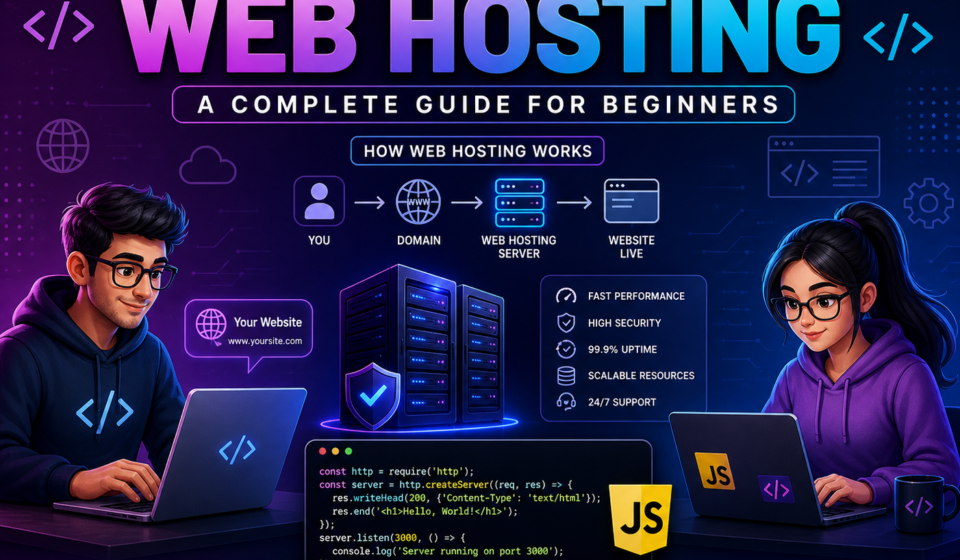
When someone visits your website, here’s what happens behind the scenes:
- The visitor types your domain name into their browser
- The DNS (Domain Name System) translates that domain into the IP address of your hosting server
- The browser sends an HTTP or HTTPS request to your server
- The server locates the requested files — the HTML page, CSS stylesheets, JavaScript, images — and sends them back
- The browser renders those files into the visual page the visitor sees
This happens in milliseconds. How quickly it happens — and how reliably — depends significantly on the quality of your hosting.
Key Components of Web Hosting
When you’re comparing hosting plans, you’ll see the same technical terms come up repeatedly. Here’s what they actually mean.
| Component | What It Means |
|---|---|
| Server | The physical or virtual computer storing your website files |
| Storage | How much disk space you have for files, images, and databases |
| Bandwidth | How much data can be transferred between your site and visitors per month |
| Uptime | The percentage of time your site stays online. 99.9% means roughly 8.7 hours of downtime per year |
| TTFB | Time to First Byte — how quickly the server starts responding. A key performance metric |
| SSL Certificate | Enables HTTPS by encrypting the connection between server and visitor |
| Control Panel | The interface for managing your hosting (cPanel, Plesk, or a custom dashboard) |
| CDN | Content Delivery Network — a global network that caches your content closer to visitors, reducing load times |
One metric worth paying particular attention to is TTFB (Time to First Byte). It measures how quickly the server starts responding to a request — before any content has loaded. Good WordPress hosting should deliver a TTFB under 300ms. Shared hosting typically measures 900–1400ms, which is slow enough to negatively affect your Core Web Vitals scores and SEO rankings. It’s a more meaningful performance indicator than the marketing claims on most hosting pages.
Types of Web Hosting
Not all hosting is the same. There are several different arrangements for how server resources are divided and managed, each suited to different needs and budgets.
1. Shared Hosting
Shared hosting puts hundreds (sometimes thousands) of websites on a single server, all sharing the same CPU, RAM, and resources. It’s the cheapest option and the most common starting point for beginners.
The upside is price — shared hosting typically costs between $2 and $10 per month. The downside is performance. Because you’re sharing resources with many other sites, your site’s speed can be affected by what those other sites are doing. If a neighbor site gets a traffic spike, your site may slow down too — a phenomenon sometimes called the “noisy neighbor” effect.
For a personal blog, portfolio, or small informational site with modest traffic, shared hosting is perfectly adequate. For anything business-critical or traffic-heavy, it’s a starting point you’ll eventually outgrow.
Best for: Beginners, personal blogs, small websites with low traffic
Typical price: $2–$10/month
2. VPS Hosting (Virtual Private Server)
VPS hosting divides a single physical server into multiple isolated virtual servers. Each virtual server has its own dedicated allocation of CPU, RAM, and storage — which means your performance isn’t affected by other websites on the same machine.
It gives you significantly more control than shared hosting. You can configure the server environment, install custom software, and choose your operating system. The tradeoff is that an unmanaged VPS requires actual server administration knowledge — if something breaks, fixing it is your responsibility. Managed VPS options are available where the host handles maintenance, at a higher price.
Best for: Growing websites, developers comfortable with server administration, small businesses needing consistent performance
Typical price: $6–$40/month
3. Dedicated Hosting
With dedicated hosting, you rent an entire physical server exclusively for your website. No sharing, no noisy neighbors — all resources are yours. This means maximum performance, full control over the server environment, and the ability to handle very high traffic volumes.
The cost reflects that exclusivity. Dedicated servers typically start at $80/month and go up significantly from there. You also generally need real server administration skills to manage one properly, unless you opt for a managed dedicated plan.
Best for: High-traffic websites, large businesses, applications with strict security or compliance requirements
Typical price: $80–$300+/month
4. Cloud Hosting
Cloud hosting distributes your website across multiple connected servers rather than a single machine. If one server has problems, another takes over — which makes cloud hosting inherently more resilient than single-server arrangements. Resources can also be scaled up or down dynamically based on demand, which makes it well-suited for sites with unpredictable traffic.
Pricing for cloud hosting is often usage-based, which means costs can vary month to month depending on traffic and resource consumption. Major cloud platforms (AWS, Google Cloud, DigitalOcean) require technical knowledge to set up properly; many hosting providers now offer managed cloud hosting that handles the complexity for you.
Best for: Applications with variable or unpredictable traffic, modern web apps, businesses prioritizing uptime
Typical price: From $10/month, variable by usage
5. Managed WordPress Hosting
Managed WordPress hosting is specifically optimized for WordPress websites. The hosting provider handles server-level performance tuning, automatic WordPress updates, daily backups, security monitoring, and often includes built-in caching and CDN integration. Instead of putting a thousand websites on each server, managed hosts typically put far fewer — which means each site gets better performance and more attentive infrastructure.
The cost is higher than shared hosting, but you’re paying for the managed environment and WordPress expertise. For users who want their WordPress site to simply work well without having to think about server configuration, it’s often worth it.
Best for: WordPress site owners who want strong performance and minimal maintenance overhead
Typical price: $20–$60+/month
6. Static and Serverless Hosting
Worth mentioning for developers: if your site is built with a static site generator (like Next.js, Astro, Hugo, or Gatsby) and doesn’t require server-side processing, static hosting platforms like Netlify, Vercel, or Cloudflare Pages can host your site for free or very low cost. Since there’s no server to manage and content is served directly from a CDN, performance is typically excellent.
Best for: Developer portfolios, documentation sites, JAMstack applications
Typical price: Free tier available on most platforms
How Web Hosting Affects SEO
Hosting has a more direct impact on SEO than many beginners realize.
Google uses Core Web Vitals — including Largest Contentful Paint (LCP) and Time to First Byte — as ranking signals. A slow server that takes over a second to start responding makes it nearly impossible to achieve good LCP scores, regardless of how well your content is optimized. Starting with faster hosting gives every other performance optimization you do a better foundation to build on.
Server uptime matters too. A site that’s frequently down isn’t just frustrating for visitors — it signals to search engines that the site is unreliable. Look for hosts that offer and actually deliver a 99.9% uptime guarantee, and check independent uptime monitoring reviews rather than relying solely on the host’s own marketing claims.
How to Choose the Right Hosting
The right choice depends on where you are and what you’re building. A few honest guidelines:
- Starting a personal blog or portfolio: shared hosting is fine. Pick a reputable provider, don’t overthink it, and upgrade later if you need to.
- Building a WordPress site for a business: either a quality shared plan with LiteSpeed servers and caching, or managed WordPress hosting. Avoid the cheapest shared plans where TTFB exceeds 1 second.
- Running a WooCommerce store: at minimum a VPS with adequate RAM. A WooCommerce store processing real orders needs at minimum a VPS with 2 GB RAM to handle the database queries reliably.
- Building a web app: cloud hosting or a managed VPS, depending on your technical comfort level and scaling needs.
- Developer portfolio or static site: Netlify, Vercel, or Cloudflare Pages — free tier is usually sufficient.
Key things to verify before committing to any host:
- Independent uptime data (not just the host’s own claims)
- Actual TTFB benchmarks from independent reviews
- What the renewal price is — many hosts offer low introductory rates that increase significantly at renewal
- What’s included vs. what costs extra (SSL, backups, CDN, migrations)
- Quality of support — especially important if something breaks at an inconvenient time
Our Hosting Recommendation
For most WordPress beginners and bloggers, we recommend Hostinger. It offers LiteSpeed-powered servers with built-in caching, a free CDN on Business plans and above, a clean control panel, and pricing that’s genuinely competitive without hiding costs. Their WordPress-specific optimizations make a noticeable difference in TTFB compared to generic shared hosting at similar price points.
If you use our affiliate link, you’ll get their newcomer discount plus an additional 20% off your plan.
👉 Get Hostinger WordPress Hosting with an extra 20% discount
That said, Hostinger isn’t the only good option. SiteGround, Cloudways (managed cloud), and Kinsta (premium managed WordPress) are all solid depending on your budget and requirements. The most important thing is choosing a host with proven performance data, not just the cheapest one you can find.
A Brief History of Web Hosting
Web hosting is younger than most people realize. In 1991, the world’s first website went live on a server at CERN — hosted on Tim Berners-Lee’s own workstation. Commercial web hosting as a service didn’t exist until around 1995, when companies began offering server space for rent as the commercial web started to take off.
Through the late 1990s and 2000s, shared hosting became increasingly affordable, and domain registration dropped in price enough for individuals and small businesses to establish an online presence without significant investment. The 2010s brought widespread cloud adoption, and today a significant portion of the web runs on major cloud infrastructure from AWS, Google Cloud, and Microsoft Azure — often accessed through hosting providers who layer managed services on top.
Final Thoughts
Web hosting is one of those decisions that’s easy to underestimate when you’re starting out. It feels like a commodity — pick the cheapest option and move on. But hosting is the foundation everything else sits on. A slow or unreliable server undermines your content, your SEO, and your visitors’ experience in ways that are genuinely hard to fix after the fact.
Take a little time to understand what you actually need, match it to the right hosting type, and check independent benchmarks before committing. The right hosting choice won’t make your website great on its own — but the wrong one will make it harder for everything else to work well.
Discover more from Developer Hint
Subscribe to get the latest posts sent to your email.
Content Disclosure
This content was created with the assistance of AI tools and thoroughly reviewed, fact-checked, and refined by a human editor to ensure accuracy, clarity, and usefulness for readers.Advertisements