10 Web Development Projects to Build as a Beginner (With What You’ll Actually Learn)

You can understand HTML, CSS, and JavaScript concepts perfectly while following a course and still freeze up the moment you open an empty folder and try to build something from scratch. That’s not a contradiction — it’s just how the skill works. Watching a concept explained and being able to apply it yourself are two different things, and a blank editor is where that gap shows up.
This list gives you ten beginner web development projects that get progressively harder, each one built to practice a specific set of skills rather than just pad out a portfolio. Take something as simple as an array of tasks:
const tasks = ["Study", "Code", "Exercise"];Knowing that syntax is one thing. Actually building something that adds, removes, filters, searches, saves, and displays those tasks dynamically means combining several concepts at once — and that combination is exactly what makes a project different from a tutorial exercise.
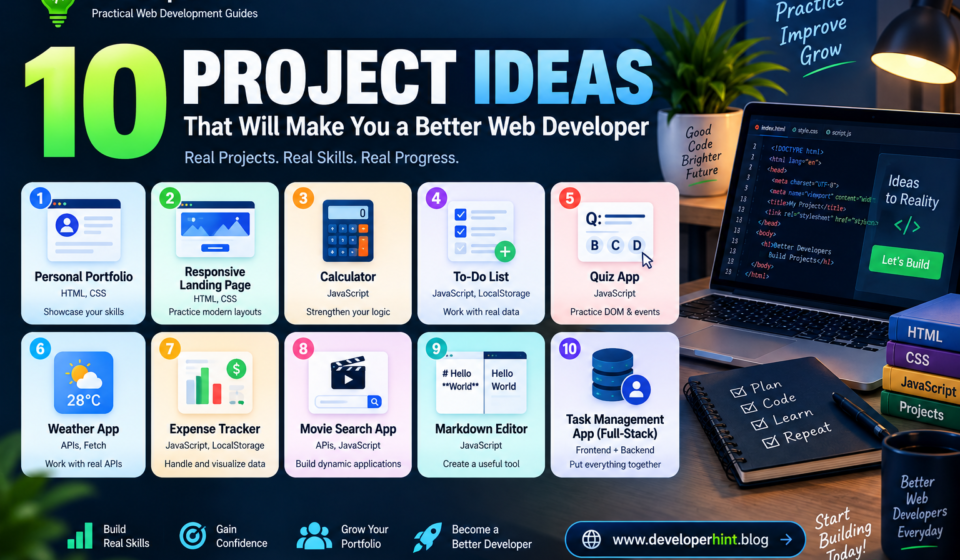
1. Personal Portfolio Website
Difficulty: Beginner
A portfolio site is one of the best places to start, since it lets you practice HTML and CSS fundamentals while building something you’ll actually want to show people later. A reasonable structure includes an about section, your skills, a projects list, education or experience, and a way for people to contact you.
This project is where you’ll get real practice with semantic HTML, Flexbox and Grid layouts, responsive design, typography, navigation, basic forms, and accessibility fundamentals.
Challenge: don’t stop at a desktop layout. Make sure it holds up on phones and tablets too — that’s what actually forces you to understand responsive design instead of just copying a fixed layout.
2. Responsive Landing Page
Difficulty: Beginner
Build a landing page for a fictional product or service — something like “DeveloperHint — Learn Web Development” works fine. A typical structure includes a hero section, features, how-it-works, pricing, testimonials, a call to action, and a footer.
This one is mostly about CSS: positioning, Flexbox, Grid, responsive layouts, buttons, cards, spacing, color systems, transitions, and media queries.
Challenge: sketch out a design idea yourself rather than copying one from a tutorial, and when you get stuck, search for the specific problem instead of a full walkthrough. “How to center a div with CSS Grid” gets you unstuck faster than “landing page tutorial.”
3. Calculator
Difficulty: Beginner
A calculator looks simple, but it’s a genuinely useful exercise in logic and user interaction. Support the basics first — addition, subtraction, multiplication, division, clear — before adding anything more.
function add(a, b) {
    return a + b;
}
This gives you practice with variables, functions, conditionals, events, DOM manipulation, and converting user input into usable numbers. The goal isn’t an advanced calculator — it’s understanding how JavaScript turns input into output.
Challenge: once the basics work, add keyboard support, decimal handling, a delete key, and a small calculation history.
4. To-Do List
Difficulty: Beginner to intermediate
A to-do list is one of the most genuinely useful projects for learning JavaScript, because it needs you to add, complete, delete, edit, filter, and search tasks — all at once, all working together.
const tasks = [
    {
        title: "Learn JavaScript",
        completed: false
    }
];
This introduces DOM manipulation, events, arrays, objects, functions, and form handling, using actual application data instead of isolated code snippets.
Challenge: save the tasks with localStorage so refreshing the page doesn’t wipe everything out. That one addition teaches you a surprising amount about how browser storage works.
5. Quiz Application
Difficulty: Beginner to intermediate
Build a small interactive quiz that shows a question, lets the user pick an answer, tells them if they’re right, and shows a final score at the end.
const questions = [
    {
        question: "What does CSS stand for?",
        options: [
            "Cascading Style Sheets",
            "Computer Style System",
            "Creative Style Syntax"
        ],
        answer: 0
    }
];
This is good practice for arrays, objects, functions, DOM manipulation, event handling, conditional logic, and keeping track of state as the user moves through questions.
Challenge: add a timer, a progress indicator, difficulty levels, randomized question order, or a simple high-score list.
6. Weather Application
Difficulty: Intermediate
This is the first project on the list that talks to an external service. Let the user enter a city and pull back real weather data — temperature, conditions, humidity, wind speed.
async function getWeather(city) {
    const response = await fetch(API_URL);
    const data = await response.json();

    return data;
}
You don’t need to memorize every detail of this the first time you write it — focus on understanding what it’s doing and why. This project is where APIs, HTTP requests, fetch(), JSON, promises, async/await, and error handling stop being abstract concepts and start being things you’ve actually used.
Challenge: handle the situations a real app has to deal with — a city that doesn’t exist, a failed request, no internet connection, and a loading state while data comes back. A good application tells the user what’s happening in each of those cases instead of just breaking silently.
7. Expense Tracker
Difficulty: Intermediate
Build something that lets users log income and expenses and see a running balance — salary coming in, groceries and bills going out.
const transactions = [
    {
        description: "Food",
        amount: -25
    },
    {
        description: "Salary",
        amount: 2000
    }
];
This gives you real practice with forms, arrays, objects, running calculations, DOM updates, local storage, filtering, and sorting.
Challenge: add a simple chart showing spending by category. It’s a small addition that introduces basic data visualization and makes the whole project feel a lot closer to something real.
8. Movie Search Application
Difficulty: Intermediate
Build a search tool that pulls movie details — title, year, genre, rating, poster — from a public movie API based on whatever the user types in.
This project covers API requests, building search functionality, debouncing input so you’re not firing a request on every keystroke, rendering results dynamically, error handling, loading states, and working with data you don’t control.
Challenge: add search history, a favorites list, pagination, a details view for each movie, and a responsive card layout. Each of those pushes the project a little closer to something you’d actually ship.
9. Markdown Editor
Difficulty: Intermediate to advanced
This one feels more like an actual developer tool. Build a two-panel editor — Markdown on one side, a live rendered preview on the other, updating as the user types.
It introduces text processing, input events, dynamic rendering, state management, splitting an interface into panels, working with a parsing library, and thinking about basic security considerations when rendering user-generated HTML.
Challenge: add a character and word count, a copy button, a download-as-.md option, dark mode, and autosave.
10. Full-Stack Task Management Application
Difficulty: Advanced
This is where you bring everything together. Build a task manager where users can create accounts, log in, create and edit tasks, set priorities and deadlines, filter and search, and have their data persist in an actual database rather than the browser.
A simplified stack might pair a frontend built with React, Vue, or plain JavaScript with a backend in Node.js, Python, or PHP, and a database like PostgreSQL, MySQL, or MongoDB.
This project introduces authentication, REST APIs, databases, CRUD operations, server-side programming, validation, security, and deployment — the point where web development stops being just HTML and CSS and starts looking like software engineering.
How to Pick the Right Project for You
Don’t jump straight to the hardest project on this list just because it looks impressive. The most useful project is one that’s slightly beyond your current ability — comfortable enough that you can actually make progress, but unfamiliar enough that you’ll genuinely have to figure things out. A project that’s too easy teaches you very little, and one that’s wildly beyond your current skills tends to just leave you overwhelmed and back on YouTube.
You also don’t need to build all ten projects right away, or in this exact order. Pick one, finish it, improve it a little, and then move to the next. Each project you complete makes the next one easier, because you’re carrying real experience forward instead of starting from zero every time.
How to Actually Approach Each Project
Try building before you search for help, not the other way around. Open your editor, attempt the project on your own, and only look things up once you actually hit a wall — and when you do, search for the specific problem rather than a full tutorial. “How to filter an array in JavaScript” or “why does my fetch request return a 404” will get you unstuck faster than rewatching someone build the whole thing.
AI tools fit into this the same way. There’s a real difference between asking “build my entire weather app” and asking “my fetch request is returning a 404 — here’s my code, what’s wrong?” or “explain why this function isn’t updating the DOM.” The second kind of question keeps you in the problem-solving loop instead of removing you from it entirely, which is the whole point of building the project in the first place.
What to Do Once It Works
Getting a project to run is the first milestone, not the finish line. Once it works, look for duplicated logic you could clean up, check whether the interface is actually clear, test keyboard navigation and color contrast, and see what happens on a slow connection or a small screen. Consider what should happen when something goes wrong — a failed request, invalid input, an empty state — since handling those gracefully is part of what separates a finished project from a working one.
Once you’re happy with it, push it somewhere real. Deploying a project — even a small one — exposes you to things local development never will: environment variables, build steps, hosting, HTTPS, and the occasional production bug that only shows up once real traffic hits it. Put the code on GitHub with a short README covering what the project does, what you used to build it, and what you learned. You don’t need to write an essay — even a few honest sentences about what tripped you up is enough to lock in what you learned and make the project genuinely useful to look back on later.
Quick Reference: What Each Project Teaches
| Project | Main Skill Focus |
|---|---|
| Portfolio Website | HTML + CSS fundamentals |
| Landing Page | Responsive design |
| Calculator | JavaScript logic |
| To-Do List | DOM manipulation + state |
| Quiz App | JavaScript + event handling |
| Weather App | APIs + async JavaScript |
| Expense Tracker | Data handling + calculations |
| Movie Search | APIs + search functionality |
| Markdown Editor | Application logic + state |
| Task Manager | Full-stack development |
Wrapping Up
None of these ten projects are original — plenty of people have built a calculator or a weather app before you. That’s not the point. You’re not building them because the internet is short on to-do apps; you’re building them because each one gives you a reason to actually use skills you’ve only seen explained in a video. A calculator forces you to turn input into logic. A weather app forces you to deal with real asynchronous data. A task manager forces you to think about a whole system instead of one page.
Start with whichever project on this list feels slightly out of reach, finish it even if it’s rough, and let the next one raise the difficulty a little further. That’s a far more reliable way to become a capable developer than watching another round of tutorials — and it’s exactly the kind of hands-on problem-solving that shows up once you’re building for a real team, not just yourself.
Discover more from Developer Hint
Subscribe to get the latest posts sent to your email.
Content Disclosure
This content was created with the assistance of AI tools and thoroughly reviewed, fact-checked, and refined by a human editor to ensure accuracy, clarity, and usefulness for readers.Advertisements