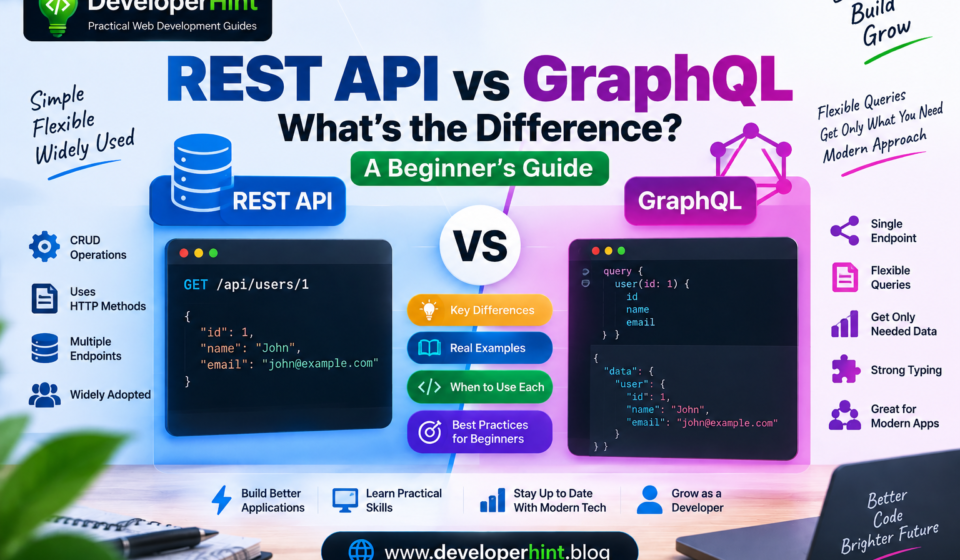

If you’ve spent any time reading backend or full-stack content, you’ve probably run into developers debating REST APIs versus GraphQL. Both exist to solve the same basic problem — letting a frontend application talk to a backend server — but they go about it in noticeably different ways.
A REST API typically spreads that communication across multiple endpoints:
GET /api/users
GET /api/users/123
GET /api/posts
GET /api/posts/123
GraphQL, on the other hand, usually exposes one endpoint and lets the client describe exactly what it wants in the request itself:
query {
  user(id: 123) {
    name
    email
  }
}
Neither approach is universally better — which one makes sense depends heavily on the application. This guide walks through how each one works, where they genuinely differ, and how to think about choosing between them.
A Quick Refresher on APIs
API stands for Application Programming Interface, and in web development it’s what lets different parts of an application talk to each other. When a frontend needs the latest articles from a blog, it sends a request, the backend processes it, pulls whatever’s needed from the database, and sends a response back. Both REST and GraphQL are just different ways of shaping that same conversation.
How REST Works
REST stands for Representational State Transfer, and it’s an architectural style built around organizing an API by resource — things like /users, /posts, or /products. Different HTTP methods then act on those resources: GET retrieves data, POST creates it, PUT or PATCH updates it, and DELETE removes it. Together, those four actions map onto CRUD — Create, Read, Update, Delete — a pattern you’ll run into constantly once you start building anything database-backed.
A request to a blog’s REST API might look like this:
GET /api/posts/1{
"id": 1,
"title": "Learning JavaScript",
"author": "John"
}The URL itself tells the server exactly which resource you’re asking for, which is a big part of why REST tends to feel intuitive early on — the mental model is just “URL plus method equals action.”
How GraphQL Works
GraphQL is a query language for APIs, paired with a runtime for executing those queries against your data. The key difference from REST is who decides what comes back in the response — with REST, the server generally defines that shape for each endpoint; with GraphQL, the client specifies exactly which fields it wants:
query {
  post(id: 1) {
    title
    author
  }
}
{
"data": {
"post": {
"title": "Learning JavaScript",
"author": "John"
}
}
}Beyond queries, GraphQL also has mutations for changing data and subscriptions for receiving real-time updates when something changes:
mutation {
  createPost(title: "Learning GraphQL") {
    id
    title
  }
}
The Real Difference: Who Decides What Data Comes Back
Say a page needs a user’s name, their profile picture, their latest posts, and the comments on those posts. With REST, that often means several separate requests, since related data commonly lives behind separate endpoints:
GET /api/users/123
GET /api/users/123/posts
GET /api/posts/456/comments
With GraphQL, one query can describe the entire data requirement at once:
query {
  user(id: 123) {
    name
    profilePicture
    posts {
      title
      comments {
        text
      }
    }
  }
}
This gets at the two problems GraphQL was largely designed to solve. Over-fetching happens when a REST endpoint returns more data than a page actually needs — an endpoint might send back a user’s full profile, including their address and account timestamps, when the page only needed their name. Under-fetching is the opposite problem: an endpoint doesn’t return enough, so the frontend has to make a second (or third) request to assemble everything a screen needs. GraphQL’s client-driven queries can reduce both, since the client only asks for what it’s going to use, and can pull related data together in a single round trip.
It’s also worth knowing that a REST API typically has many endpoints — /api/users, /api/posts, /api/comments, and so on — while GraphQL usually exposes just one, often something like /graphql, with the query itself determining what comes back. That’s not an absolute rule for either technology, but it’s a useful way to picture the difference early on.
GraphQL’s Schema and Type System
GraphQL APIs are built around a schema that describes exactly what data and operations the API supports:
type User {
  id: ID!
  name: String!
  email: String!
}

type Query {
  users: [User!]!
  user(id: ID!): User
}
That schema makes the API’s capabilities explicit and queryable — a feature called introspection lets tools ask the API about its own available types, fields, and operations. That’s part of why GraphQL tooling tends to offer strong autocomplete and built-in documentation: the schema itself is the source of truth for what’s possible.
Status Codes, Caching, and Versioning
REST leans naturally on HTTP itself. A missing resource returns a 404, a successful creation returns a 201, and standard HTTP caching mechanisms like Cache-Control and ETag work the way they normally would, since REST requests map cleanly onto individual URLs. GraphQL generally returns a successful HTTP response even when something goes wrong at the application level, representing errors inside the GraphQL response body instead — and caching gets more complicated, since many different queries can all hit the same single endpoint, which standard HTTP caching isn’t built to distinguish between. GraphQL clients and servers typically need their own caching strategies to handle this well.
The two also handle change differently over time. REST APIs often version their URLs as they evolve — /api/v1/users becoming /api/v2/users — so older clients can keep working against an older version. GraphQL tends to favor evolving a single schema instead, marking fields as deprecated rather than standing up a whole new versioned API:
type User {
  name: String!
  oldUsername: String @deprecated
}
Trade-offs Worth Knowing
REST’s biggest strengths are how approachable it is and how mature its ecosystem has become — resources and HTTP methods are a simple mental model, and you can test any endpoint with a browser, curl, Postman, or a plain fetch() call. It works naturally with HTTP caching, and for a huge number of applications, a straightforward REST API is genuinely all you need. Its downsides are the over-fetching and under-fetching problems already covered, along with the fact that large APIs can sprawl into a lot of endpoints to maintain, and meaningful changes sometimes require formal versioning.
GraphQL’s strengths mirror those weaknesses: clients request exactly the fields they need, related data can be pulled together in one query, and the schema gives you strong typing plus excellent developer tooling — genuinely valuable for applications with complex, interrelated data or several different frontends consuming the same backend. The trade-off is real added complexity: you’re now learning schemas, types, resolvers, arguments, variables, and fragments on top of the API itself, caching requires deliberate design, and servers need protection against deeply nested or expensive queries. GraphQL isn’t a complete replacement for every HTTP use case either — things like file uploads often still lean on other mechanisms alongside it.
| Feature | REST | GraphQL |
|---|---|---|
| API style | Resource-oriented | Schema and query-oriented |
| Endpoints | Multiple | Usually a single endpoint |
| Data shape | Server-defined per endpoint | Client specifies fields |
| Core operations | GET, POST, PUT, PATCH, DELETE | Queries, mutations, subscriptions |
| Over/under-fetching | Can happen | Generally reduced |
| HTTP caching | Natural fit | Needs extra strategy |
| Learning curve | Lower | Higher |
| Best fit | Conventional CRUD apps | Complex, interrelated data |
REST and GraphQL in a MERN Project
Both work fine inside a React or MERN application — the frontend framework and database don’t lock you into either style. A REST-based React app typically fetches data like this:
fetch("/api/posts")
    .then(response => response.json())
    .then(data => {
        console.log(data);
    });
A GraphQL-based app sends its query to a single endpoint instead, usually through a dedicated GraphQL client library rather than hand-writing the request every time. Either way, on the backend, Express and Node.js can serve REST routes or a GraphQL endpoint equally well, with MongoDB (or any database) sitting behind either one.
Which Should You Learn First — and When Should You Use Each?
If you’re new to backend development, REST is worth learning first. Its concepts — HTTP, requests, responses, status codes, CRUD — form the foundation that makes GraphQL easier to pick up later, rather than something you’re learning in isolation.
REST tends to be the right call when your data model is fairly straightforward, standard HTTP caching matters, your clients don’t need heavily customized queries, or you’re building a fairly conventional CRUD application — a blog API, a simple e-commerce backend, or an internal company tool all fit comfortably here. GraphQL earns its added complexity when different clients genuinely need different data shapes, your application has complex relationships between resources, multiple frontends share one backend, or you want a strongly typed schema as a contract between frontend and backend teams — think complex dashboards or large content platforms with deeply nested data.
It’s also worth knowing these aren’t mutually exclusive. Plenty of real systems use REST for simpler pieces like authentication or file uploads, and GraphQL for the more complex, interrelated application data — the architecture should follow what the application actually needs, not a rule that says pick one and use it everywhere.
A Few Misconceptions Worth Clearing Up
GraphQL doesn’t replace HTTP — it typically runs over HTTP, so it’s more accurate to think of it as a query language and runtime that uses HTTP as transport, not an alternative to it. REST, for its part, isn’t a programming language; it’s an architectural style you can implement in virtually any language or framework. GraphQL also isn’t automatically faster than REST — its ability to request specific fields can cut down on unnecessary data transfer, but a poorly designed resolver can just as easily make a GraphQL API slower than a well-built REST one. And neither technology replaces your database — both sit in the API layer, between the frontend and whatever’s actually storing the data. The most useful question to ask isn’t which one shows up more often in tutorials, but what your specific application actually needs.
Wrapping Up
REST and GraphQL are answering the same underlying question — how should a frontend talk to a backend — just from different angles. REST organizes that conversation around resources and endpoints, which makes it approachable and a great fit for a huge share of applications. GraphQL organizes it around a schema and client-specified queries, trading some simplicity for flexibility that pays off once your data gets genuinely complex or interrelated.
You don’t need to pick a side early in your learning. Get comfortable with HTTP, requests, responses, and REST first, then explore GraphQL once those fundamentals feel solid. For developers, understanding both isn’t about memorizing query syntax — it’s about recognizing which shape of API problem you’re actually solving, since that judgment call is exactly what separates picking the right tool from just picking the familiar one.
Discover more from Developer Hint
Subscribe to get the latest posts sent to your email.
Content Disclosure
This content was created with the assistance of AI tools and thoroughly reviewed, fact-checked, and refined by a human editor to ensure accuracy, clarity, and usefulness for readers.Advertisements