
It’s one of those mistakes that’s easy to make when you’re just starting out. Someone asks about your website and you say “I have a webpage” — or the other way around. Most people let it slide, but the two words actually mean different things, and understanding the distinction gives you a clearer mental model of how the web is structured.
This isn’t just about using the right vocabulary. Knowing how websites and webpages relate to each other helps you think about site structure, URL organization, SEO, and how browsers actually retrieve and display content. It’s a small concept that punches above its weight.
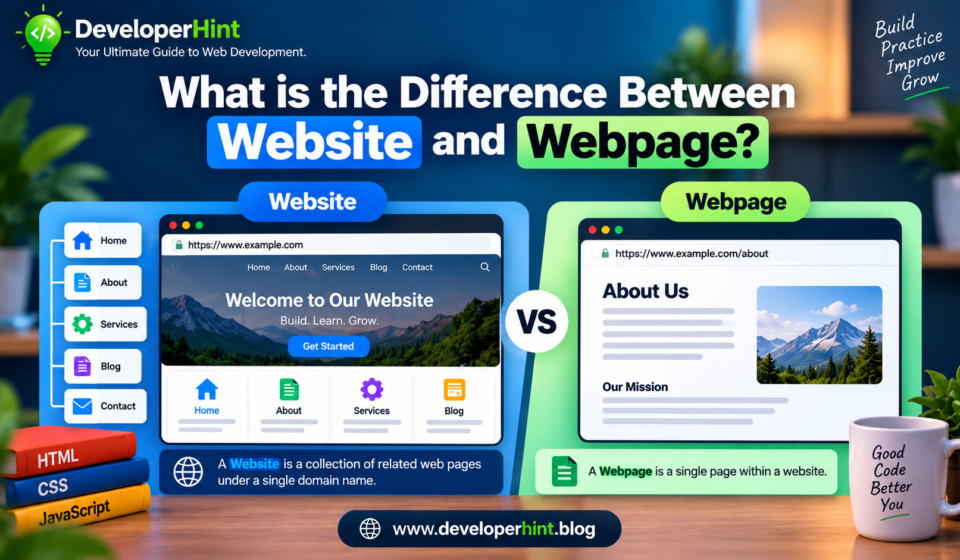
A website is a collection of related pages grouped under a single domain name. A webpage is one individual document within that collection.
The classic analogy: if a website is a book, then each webpage is a page inside that book. The book has a title and a cover (the domain and homepage), and everything inside is organized under that one identity. Each individual page has its own content, but they all belong to the same book.
- Website:
https://developerhint.blog— the whole thing, everything under this domain - Webpage:
https://developerhint.blog/about— one specific page within it
What Is a Website?
A website is the complete package — all the pages, files, images, and resources stored on a server under a single domain name, linked together so visitors can navigate between them.
Most websites include several different sections, each serving a specific purpose. A typical site might have a homepage that introduces the site, an about page that explains who’s behind it, a blog section with articles, and a contact page where visitors can get in touch. All of these live under the same domain and are connected through navigation menus and internal links.
The domain name is what identifies a website on the Internet. It’s the address people type to find you — developerhint.blog, for example. Behind that address, a web server stores all the site’s files and delivers them when someone visits.
A website can be as small as a single page (a one-page portfolio, for instance) or as large as millions of pages (think Wikipedia or Amazon). The defining characteristic isn’t the number of pages — it’s that they all share the same domain and are managed as a single entity.
What Is a Webpage?
A webpage is a single HTML document — one specific piece of content within a website. Every webpage has its own unique URL, its own content, and typically its own purpose.
On this site, for example:
developerhint.blog— the homepagedeveloperhint.blog/about— the about pagedeveloperhint.blog/contact— the contact pagedeveloperhint.blog/what-is-the-internet— an individual blog post
Each of those is a separate webpage. They share the same website and domain, but each one is its own document with its own URL, its own content, and its own HTML file (or dynamically generated equivalent).
When you click a link and navigate somewhere new, your browser is loading a different webpage — sending a new request to the server for that specific document and rendering it fresh.
How They Work Together
Here’s what actually happens when you visit a website, in terms of webpages:
You type developerhint.blog into your browser. Your browser sends a request to the web server at that domain. The server returns the default document for that domain — typically the homepage, often an index.html file. That’s the first webpage you see.
From there, every link you click loads a different webpage from the same website. The navigation menu at the top of the page is essentially a set of links pointing to other webpages within the same site. The website’s identity stays consistent — same domain, same visual design, same navigation — but the content changes because you’re loading different individual documents.
A website is what you experience as a whole during a visit. A webpage is what the browser actually requests and loads each time you go somewhere.
Key Differences at a Glance
| Feature | Website | Webpage |
|---|---|---|
| What it is | A collection of related pages under one domain | A single HTML document within a website |
| Example | developerhint.blog | developerhint.blog/contact |
| Files involved | Many HTML, CSS, JS, and media files | Typically one HTML file (plus shared CSS/JS) |
| Has a domain? | Yes — that’s what identifies it | No — it exists within a domain |
| Has a unique URL? | Yes (the root domain) | Yes (a path within the domain) |
| Purpose | Delivers a complete experience across multiple pages | Displays one specific piece of content |
Why the Distinction Actually Matters
Beyond getting the terminology right, this distinction has a few practical implications worth knowing about.
For site structure: thinking in terms of webpages helps you plan your URLs, navigation, and information architecture properly. Each major topic or section of your site gets its own webpage with its own URL — not everything crammed onto one page.
For SEO: search engines index individual webpages, not websites as a whole. Google ranks specific URLs, not domains. When you optimize your content for search — writing good titles, meta descriptions, headings, and internal links — you’re doing it at the webpage level. A website with 50 well-optimized pages gives Google 50 separate opportunities to rank you.
For debugging: when something breaks on your site — a page doesn’t load, a layout looks wrong, a form doesn’t submit — you’re usually dealing with a problem on a specific webpage. Knowing which document is the issue (and where its HTML, CSS, and JavaScript live) makes finding and fixing the problem much faster.
For communication: if you’re working with a designer, developer, or client, being precise matters. “The website is broken” tells someone almost nothing. “The contact webpage is returning a 404 error” tells them exactly where to look.
One More Thing: Web Page vs Webpage
You’ll see both “web page” (two words) and “webpage” (one word) used across the Internet, sometimes in the same article. Both are acceptable — language evolves, and the single-word form has become increasingly common in technical writing. There’s no meaningful difference in meaning between the two. Use whichever your style guide or personal preference dictates, just be consistent.
Final Thoughts
A website is the whole; a webpage is one of its parts. The website is what gives your presence on the Internet its identity — a domain, a cohesive design, a navigation structure. The webpages are where the actual content lives, each one a separate document with its own URL and purpose.
It’s a simple distinction, but it’s one of the building blocks for understanding how the web is organized. Once it clicks, a lot of other concepts — URL structure, internal linking, SEO, site architecture — start making more intuitive sense.
Discover more from Developer Hint
Subscribe to get the latest posts sent to your email.
Content Disclosure
This content was created with the assistance of AI tools and thoroughly reviewed, fact-checked, and refined by a human editor to ensure accuracy, clarity, and usefulness for readers.Advertisements