Skip to content
-
Subscribe to our newsletter & never miss our best posts. Subscribe Now!
Developer Hint

Your Ultimate Guide to Web Development.

Developer Hint

Your Ultimate Guide to Web Development.

  • Home
  • Web Development
  • Tech Explained
  • Developer Tools
  • Contact Us
  • Home
  • Web Development
  • Tech Explained
  • Developer Tools
  • Contact Us
Close

Search

Subscribe
Developer Hint

Your Ultimate Guide to Web Development.

Developer Hint

Your Ultimate Guide to Web Development.

  • Home
  • Web Development
  • Tech Explained
  • Developer Tools
  • Contact Us
  • Home
  • Web Development
  • Tech Explained
  • Developer Tools
  • Contact Us
Close

Search

Subscribe
Home/Web Development/CSS Specificity Explained Simply (With Practical Examples)
Css Specificity Explained Simply
Web Development

CSS Specificity Explained Simply (With Practical Examples)

blank
By Developer Hint
February 19, 2026 2 Min Read
0

Introduction

Have you ever written CSS… and it didn’t work?

You changed the color, refreshed the page, and nothing happened.

Most of the time, the problem is CSS specificity.

In this guide, you’ll learn:

  • What CSS specificity is
  • How selector priority works
  • Why some styles override others
  • How to avoid common specificity mistakes

Let’s simplify it.

What Is CSS Specificity?

CSS specificity determines which CSS rule is applied when multiple rules target the same element.

When two selectors apply to the same element, the one with higher specificity wins.

Think of it as a priority score.

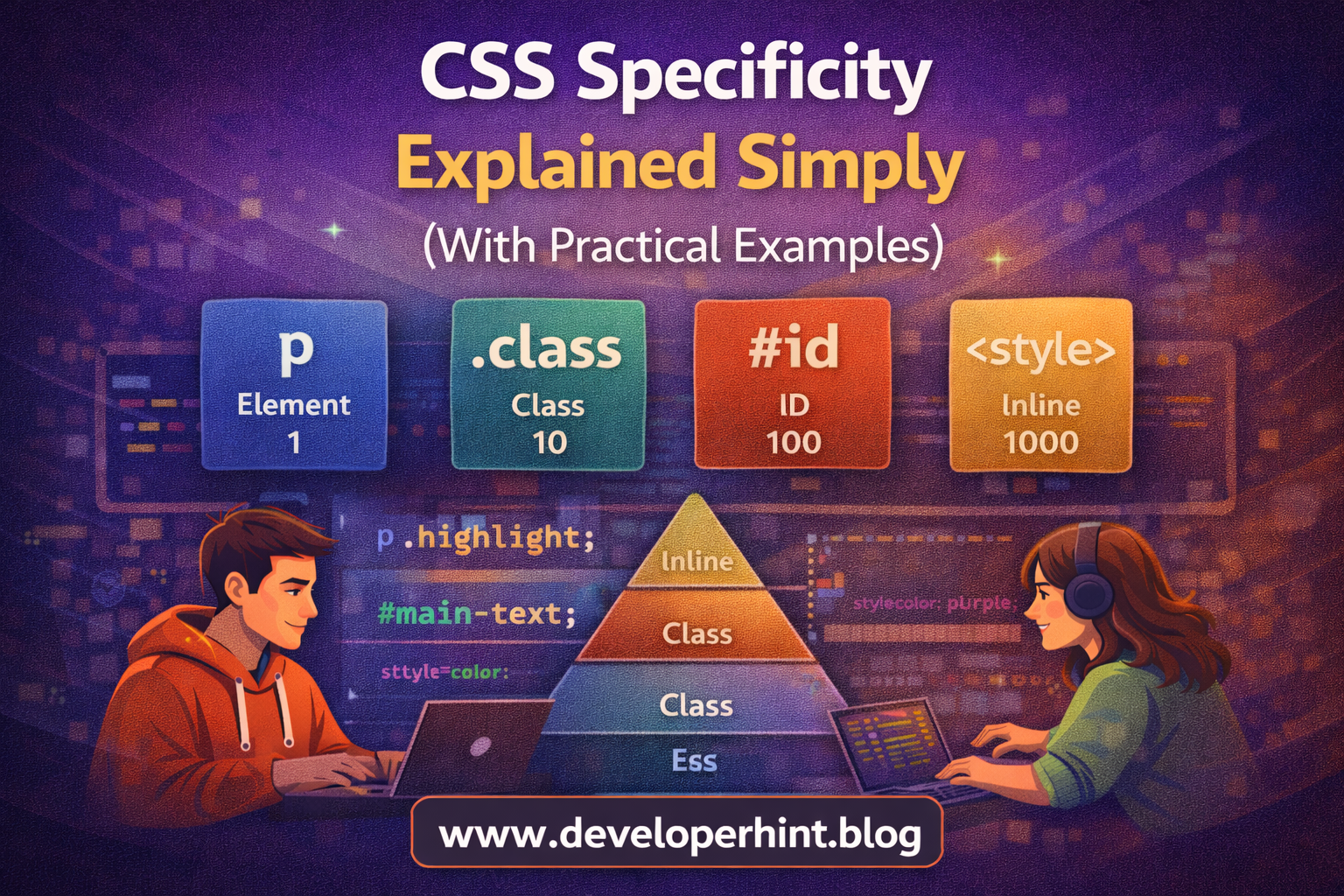
Specificity Hierarchy (From Lowest to Highest)

  1. Element selectors
  2. Class selectors
  3. ID selectors
  4. Inline styles

The higher the level, the stronger the selector.

1. Element Selector (Lowest Priority)

Example:

p {
color: blue;
}

This targets all <p> elements.

Element selectors have the lowest specificity.

2. Class Selector (Stronger)

.highlight {
color: green;
}

If a paragraph has:

<p class="highlight">Hello</p>

Green wins over blue because class is stronger than element.

3. ID Selector (Even Stronger)

#main-text {
color: red;
}

If the paragraph has both:

<p id="main-text" class="highlight">Hello</p>

Red wins because ID is stronger than class.

4. Inline Style (Very Strong)

<p style="color: purple;">Hello</p>

Inline styles override ID, class, and element selectors.

Use inline styles carefully they make maintenance harder.

Specificity Score Formula

CSS calculates specificity using a point system:

  • Inline styles → 1000
  • ID → 100
  • Class → 10
  • Element → 1

Example:

div p.highlight {
color: blue;
}

Score breakdown:

  • 1 class = 10
  • 2 elements = 2
    Total = 12

Higher score wins.

Example Conflict

p {
color: blue;
}
.highlight {
color: green;
}
#main-text {
color: red;
}

HTML:

<p id="main-text" class="highlight">Hello</p>

Final result: red.

Why? Because ID (100) beats class (10) and element (1).

What About !important?

p {
color: blue !important;
}

!important overrides almost everything.

But using it too much creates messy CSS.

Best practice: Avoid relying on !important unless absolutely necessary.

Common Specificity Mistakes

Using too many nested selectors:

body div.container ul li a {
color: blue;
}

This increases specificity unnecessarily.

Overusing IDs for styling.

Using !important everywhere.

These practices make CSS harder to manage.

Best Practices for Managing Specificity

  • Keep selectors simple
  • Prefer classes over IDs
  • Avoid deep nesting
  • Don’t overuse !important
  • Use consistent naming conventions

Modern CSS architecture encourages low specificity for better scalability.

Why Specificity Matters in Real Projects

In small projects, specificity issues are manageable.

In large applications, poor specificity structure leads to:

  • Hard-to-debug styles
  • Unexpected overrides
  • Maintenance problems

Understanding specificity makes you a more confident frontend developer.

Quick Summary

Element < Class < ID < Inline

Higher specificity wins.
If specificity is equal, the last declared rule wins.

Conclusion

CSS specificity determines which styles are applied when multiple rules target the same element, by understanding how selector priority works, you can prevent styling conflicts and write cleaner, more maintainable CSS.

At Developer Hint, we believe mastering fundamentals like specificity helps you avoid frustration and write professional-grade CSS from day one.

banner
Content Disclosure
This content was created with the assistance of AI tools and thoroughly reviewed, fact-checked, and refined by a human editor to ensure accuracy, clarity, and usefulness for readers.
Advertisements
banner

Tags:

CSSCSS basicsfrontend developmentWeb Development
blank
Author

Developer Hint

Follow Me
Other Articles
Difference Between Class And Id In Css
Previous

CSS Selectors: Class and ID Explained

Css Box Model Explained Simply
Next

CSS Box Model Explained Simply (With Practical Examples)

No Comment! Be the first one.

    Leave a Reply Cancel reply

    Your email address will not be published. Required fields are marked *

    Random Posts

    • CSS Box Model Explained Simply (With Practical Examples)CSS Box Model Explained Simply (With Practical Examples)
    • Responsive Web Design with Bootstrap’s Grid SystemResponsive Web Design with Bootstrap’s Grid System
    • Common Mistakes Beginner Web Developers MakeCommon Mistakes Beginner Web Developers Make
    • 7 Mistakes That Keep Web Developers Stuck at Beginner Level7 Mistakes That Keep Web Developers Stuck at Beginner Level
    • Flex vs Grid: When to Use CSS Flexbox and CSS Grid LayoutFlex vs Grid: When to Use CSS Flexbox and CSS Grid Layout

    Popular

    Archives

    • May 2026
    • April 2026
    • March 2026
    • February 2026
    • January 2026
    • November 2025
    • October 2025

    Categories

    • Developer Tools
    • Tech Explained
    • Web Development

    Random Posts

    • Beginner Guide to HTML & CSS (With Examples)Beginner Guide to HTML & CSS (With Examples)
    • Full Stack Web Developer Roadmap 2026: Complete Guide from Beginner to AdvancedFull Stack Web Developer Roadmap 2026: Complete Guide from Beginner to Advanced
    • How to Center a Div in CSS (7 Easy Methods Explained)How to Center a Div in CSS (7 Easy Methods Explained)
    • What Is a Computer? Definition, Types, and How It Works (Beginner’s Guide)What Is a Computer? Definition, Types, and How It Works (Beginner’s Guide)
    • What Is the Internet? Definition, History, and How It Works (Complete Guide)What Is the Internet? Definition, History, and How It Works (Complete Guide)

    Popular

    Legal pages

    • About Us
    • Privacy Policy
    • Terms and Conditions
    • Disclaimer

    Trending

    Copyright 2026 — Developer Hint. All rights reserved.

    ►
    Necessary cookies enable essential site features like secure log-ins and consent preference adjustments. They do not store personal data.
    None
    ►
    Functional cookies support features like content sharing on social media, collecting feedback, and enabling third-party tools.
    None
    ►
    Analytical cookies track visitor interactions, providing insights on metrics like visitor count, bounce rate, and traffic sources.
    None
    ►
    Advertisement cookies deliver personalized ads based on your previous visits and analyze the effectiveness of ad campaigns.
    None
    ►
    Unclassified cookies are cookies that we are in the process of classifying, together with the providers of individual cookies.
    None