Skip to content
-
Subscribe to our newsletter & never miss our best posts. Subscribe Now!
Developer Hint

Your Ultimate Guide to Web Development.

Developer Hint

Your Ultimate Guide to Web Development.

  • Home
  • Web Development
  • Tech Explained
  • Developer Tools
  • Contact Us
  • Home
  • Web Development
  • Tech Explained
  • Developer Tools
  • Contact Us
Close

Search

Subscribe
Developer Hint

Your Ultimate Guide to Web Development.

Developer Hint

Your Ultimate Guide to Web Development.

  • Home
  • Web Development
  • Tech Explained
  • Developer Tools
  • Contact Us
  • Home
  • Web Development
  • Tech Explained
  • Developer Tools
  • Contact Us
Close

Search

Subscribe
Home/Web Development/CSS Selectors: Class and ID Explained
Difference Between Class And Id In Css
Web Development

CSS Selectors: Class and ID Explained

blank
By Developer Hint
February 18, 2026 2 Min Read
0

If you’re learning CSS, one of the first confusing topics is the difference between class and ID selectors.

Both are used to style elements but they are not the same.

In this guide, you’ll learn:

  • The difference between class and ID in CSS
  • When to use each one
  • Real-world use cases
  • Best practices developers follow

Let’s simplify it.

What Is a Class in CSS?

A class is a reusable selector used to style multiple elements.

Example

<p class="highlight">First paragraph</p>
<p class="highlight">Second paragraph</p>
.highlight {
color: blue;
}

Both paragraphs will turn blue.

Key Characteristics of Class

  • Reusable
  • Can be used on multiple elements
  • An element can have multiple classes
  • Written with a dot . in CSS

Example of multiple classes:

<button class="btn primary large">Click Me</button>

What Is an ID in CSS?

An ID is a unique selector used to style one specific element.

Example

<h1 id="main-title">Welcome</h1>
#main-title {
color: red;
}

Only that element will turn red.

Key Characteristics of ID

  • Must be unique on the page
  • Used only once
  • Written with a hash # in CSS
  • Higher specificity than class

Main Differences Between Class and ID

1. Reusability

Class → Can be reused multiple times
ID → Should be used only once

2. Specificity

ID has higher CSS specificity than class.

Example:

#box {
color: red;
}
.box {
color: blue;
}

If both apply to the same element, red wins because ID is stronger.

3. Multiple Usage

You can assign:

Multiple classes to one element ✅
Only one ID per element ✅
But the same ID should not appear multiple times ❌

When to Use Class

Use class when:

  • Styling multiple elements the same way
  • Creating reusable components
  • Designing buttons, cards, layouts
  • Applying utility styles

Example use cases:

<div class="card"></div>

Classes are ideal for scalable design.

When to Use ID

Use ID when:

  • Targeting a single unique section
  • Creating page anchors
  • JavaScript DOM targeting (sometimes)
  • Major layout sections

Example:

<section id="hero"></section>

IDs are good for unique structural parts.

Best Practice: Prefer Classes

In modern development, most developers prefer classes over IDs for styling.

Why?

  • Better scalability
  • More flexible
  • Easier to maintain
  • Works better with component-based design

Frameworks like Tailwind, Bootstrap, and modern UI libraries rely heavily on classes.

Common Mistakes

  1. Using ID for styling everything ❌
  2. Repeating the same ID multiple times ❌
  3. Overusing high-specificity selectors ❌

Keeping specificity low makes CSS easier to manage.

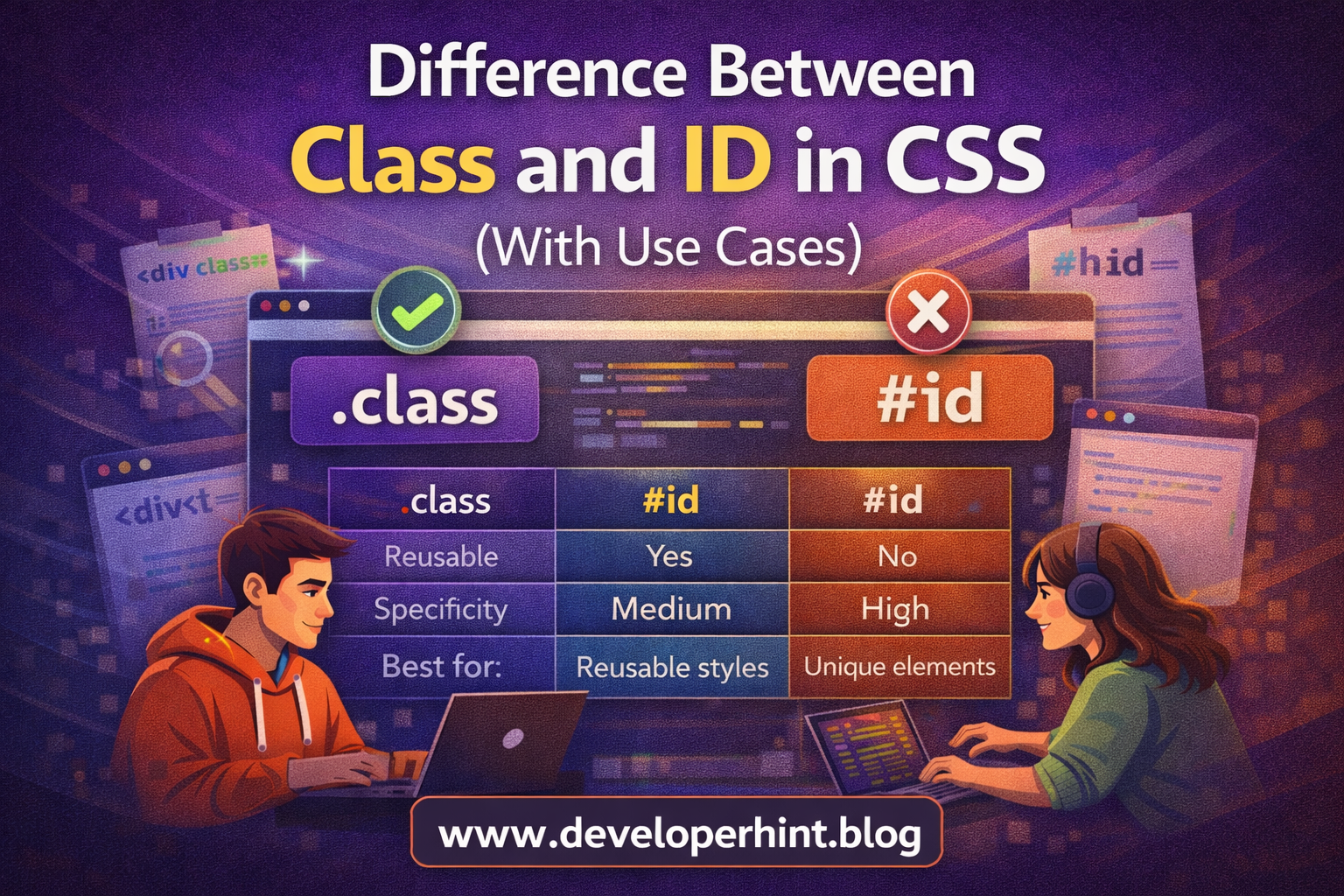
Quick Comparison Table

Class:

  • Syntax: .classname
  • Reusable: Yes
  • Specificity: Medium
  • Best for: Reusable styles

ID:

  • Syntax: #idname
  • Reusable: No
  • Specificity: High
  • Best for: Unique elements

Conclusion

The difference between class and ID in CSS comes down to reusability and specificity.

Use classes for styling multiple elements and building scalable designs.
Use IDs for unique sections or specific purposes.

At Developer Hint, we recommend keeping your CSS flexible and maintainable and that usually means relying more on classes than IDs.

banner
Content Disclosure
This content was created with the assistance of AI tools and thoroughly reviewed, fact-checked, and refined by a human editor to ensure accuracy, clarity, and usefulness for readers.
Advertisements
banner

Tags:

CSSfrontend developmentWeb Development
blank
Author

Developer Hint

Follow Me
Other Articles
Wcag Guidelines Explained
Previous

WCAG Guidelines Explained Simply for Beginners

Css Specificity Explained Simply
Next

CSS Specificity Explained Simply (With Practical Examples)

No Comment! Be the first one.

    Leave a Reply Cancel reply

    Your email address will not be published. Required fields are marked *

    Random Posts

    • CSS Box Model Explained Simply (With Practical Examples)CSS Box Model Explained Simply (With Practical Examples)
    • CSS Selectors Explained with Examples (Detailed Guide)CSS Selectors Explained with Examples (Detailed Guide)
    • Responsive Web Design with Bootstrap’s Grid SystemResponsive Web Design with Bootstrap’s Grid System
    • How to Center a Div in CSS (7 Easy Methods Explained)How to Center a Div in CSS (7 Easy Methods Explained)
    • Top 10 VS Code Extensions Every Developer Should Use in 2026Top 10 VS Code Extensions Every Developer Should Use in 2026

    Popular

    Archives

    • May 2026
    • April 2026
    • March 2026
    • February 2026
    • January 2026
    • November 2025
    • October 2025

    Categories

    • Developer Tools
    • Tech Explained
    • Web Development

    Random Posts

    • How to Center a Div in CSS (7 Easy Methods Explained)How to Center a Div in CSS (7 Easy Methods Explained)
    • Namecheap vs Hostinger: Which Hosting is Better for WordPress in 2026?Namecheap vs Hostinger: Which Hosting is Better for WordPress in 2026?
    • Why VS Code is the Top Choice for DevelopersWhy VS Code is the Top Choice for Developers
    • HTML Accessibility Basics Every Developer Should KnowHTML Accessibility Basics Every Developer Should Know
    • Responsive Web Design with Bootstrap’s Grid SystemResponsive Web Design with Bootstrap’s Grid System

    Popular

    Legal pages

    • About Us
    • Privacy Policy
    • Terms and Conditions
    • Disclaimer

    Trending

    Copyright 2026 — Developer Hint. All rights reserved.

    ►
    Necessary cookies enable essential site features like secure log-ins and consent preference adjustments. They do not store personal data.
    None
    ►
    Functional cookies support features like content sharing on social media, collecting feedback, and enabling third-party tools.
    None
    ►
    Analytical cookies track visitor interactions, providing insights on metrics like visitor count, bounce rate, and traffic sources.
    None
    ►
    Advertisement cookies deliver personalized ads based on your previous visits and analyze the effectiveness of ad campaigns.
    None
    ►
    Unclassified cookies are cookies that we are in the process of classifying, together with the providers of individual cookies.
    None