
Type a web address into your browser, hit enter, and a page loads in about a second. It feels instant and a little bit magic. But behind that one second, your computer just did something surprisingly mechanical: it looked up a number, and it used that number to find another computer somewhere in the world.
That number is an IP address, and once you understand what it’s doing, a lot of networking concepts that used to feel like jargon start making a lot more sense.
What an IP address actually is
An IP address, short for Internet Protocol address, is a unique numeric label assigned to a device on a network. Every phone, laptop, smart TV, and yes, even some fridges now, gets one when it connects. It’s the thing that lets one device say “send this data to me specifically” out of billions of other devices doing the same thing.
The postal address comparison gets used a lot for a reason: it’s accurate. Your house has an address so mail can find it among millions of other houses. Your device has an IP address so data packets can find it among billions of other devices. Same idea, much faster delivery.
An IPv4 address looks like this: 192.168.1.1. An IPv6 address looks like this: 2001:0db8:85a3:0000:0000:8a2e:0370:7334. Both do the same job. They just do it with a different amount of room to work with, which is really the whole story behind why two versions exist at all.
What happens when you visit a website
Here’s the part most people never think about: your computer doesn’t actually know what “developerhint.blog” means. Domain names exist for humans, not machines. Behind the scenes, every request goes through a quick translation step before anything loads.
- You type developerhint.blog into your browser.
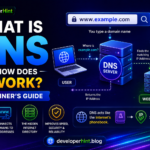
- Your device asks a DNS (Domain Name System) server to look up the IP address tied to that domain.
- DNS responds with the correct IP address.
- Your browser connects directly to that IP address.
- The server at that address sends the page back to you.
This entire exchange happens in milliseconds, and it happens every single time you load a page, stream a video, or send an email. DNS is essentially the internet’s phone book, and the IP address is the actual phone number it hands you.
IPv4 vs IPv6: why two versions exist
IPv4 was formalized back in 1981 and it’s still the version most of the internet runs on today. It uses four groups of numbers separated by dots, with each number ranging from 0 to 255, which gives you around 4.3 billion possible addresses. That sounded like an enormous number in 1981. It does not sound enormous in 2026, once you count every phone, laptop, smart speaker, and IoT sensor now online.
That shortage is exactly why IPv6 exists. The first IPv6 specification was published in 1995 and finalized a few years later, designed from the start to never run out. It uses a 128-bit address written in hexadecimal, split into eight groups separated by colons, which works out to roughly 340 undecillion possible addresses. For context, that’s 340 followed by 36 zeros. IPv6 was built to comfortably outlast the growth of the internet for the foreseeable future.
Both versions run side by side today, and that’s likely to stay true for a while. Most networks support both, and your device is probably already using both without you noticing.
| IPv4 | IPv6 |
|---|---|
| 32-bit address | 128-bit address |
| Written in decimal, separated by dots | Written in hexadecimal, separated by colons |
| About 4.3 billion total addresses | About 340 undecillion total addresses |
| Still the most widely used version | Growing steadily, especially on mobile networks |
The IPv4 address ranges worth knowing
Not every IPv4 address is available for general use. Certain ranges are reserved for specific jobs, and recognizing them will save you confusion the first time you see one in a router setting or a server log.
| Range | Purpose |
|---|---|
| 0.0.0.0 | Default route or “this network” |
| 127.0.0.0 – 127.255.255.255 | Loopback, this is your own machine (localhost) |
| 10.0.0.0 – 10.255.255.255 | Private network use |
| 172.16.0.0 – 172.31.255.255 | Private network use |
| 192.168.0.0 – 192.168.255.255 | Private network use |
| 255.255.255.255 | Broadcast address |
Best for: if you’re debugging a local dev server and it’s bound to 127.0.0.1, that’s not a bug, that’s the loopback address working exactly as intended. Traffic never leaves the machine.
Public, private, static, and dynamic: the four labels that actually matter
Beyond IPv4 and IPv6, IP addresses also get grouped by how they’re used day to day.
A public IP address is the one your internet provider assigns to your connection, and it’s what the wider internet sees when your traffic leaves your home or office network. A private IP address only means something inside your local network, which is why your laptop, phone, and smart TV can all quietly share addresses like 192.168.1.x without ever colliding with anyone else’s home network.
Static IP addresses stay fixed over time, which is exactly why servers and business connections tend to use them: you want the same address reachable every day. Dynamic IP addresses get reassigned periodically by your provider, which is the more common and cheaper setup for home internet, since most home users never need a permanently fixed address.
How developers actually work with IP addresses
For anyone building on the web rather than just browsing it, IP addresses show up constantly in day-to-day work, usually without much fanfare. A Node.js or Express server, for instance, can read the requester’s address directly off the incoming request:
app.get('/', (req, res) => {
  const clientIp = req.ip;
  console.log(`Request received from ${clientIp}`);
  res.send('Hello!');
});
That single line is behind a lot of features you’ve probably used without thinking about it: rate limiting, geographic redirects, fraud detection, and basic analytics all lean on the requester’s IP as a starting signal. It’s not a perfect identifier, since IPs get shared, reassigned, and masked by VPNs, but it’s often the first and cheapest piece of context a server has to work with.
IP addresses and privacy
Your public IP address can reveal your general region and your internet service provider. It cannot pinpoint your home address, whatever movies and crime dramas might suggest. It’s more like knowing someone’s city than knowing their street.
Still, that general information is enough that a lot of people choose to route their traffic through a VPN, which swaps their visible IP for the VPN provider’s own address. If privacy matters for a particular use case, stick to a reputable VPN provider and avoid broadcasting your IP on unsecured public networks.
A few myths worth clearing up
A public IP address does not expose your exact home address, only an approximate region tied to your provider. Most home connections use dynamic IPs, so the idea that a device keeps one address forever is usually wrong. And IPv6 hasn’t replaced IPv4 overnight or anytime soon, the two are running in parallel and will likely continue to for years.
Wrapping up
An IP address is a small piece of the internet’s plumbing that ends up mattering for almost everything built on top of it. Once you know how DNS turns a domain into a number, and how that number routes traffic to the right device, a lot of networking, deployment, and debugging work stops feeling like a black box.
At Developer Hint, that’s the goal with topics like this one: take the infrastructure that quietly runs the internet and make it something you can actually reason about while you’re building.
Discover more from Developer Hint
Subscribe to get the latest posts sent to your email.
Content Disclosure
This content was created with the assistance of AI tools and thoroughly reviewed, fact-checked, and refined by a human editor to ensure accuracy, clarity, and usefulness for readers.Advertisements