
If you have ever stared at a page layout wondering whether a chunk of markup should be a div, a section, or an article, you are in good company, all three are block-level containers, all three look identical in a browser until you style them, and plenty of working sites use them interchangeably.
But they do not mean the same thing, and picking the right one makes your HTML easier to read, easier to maintain, and more useful to screen readers and search engines.
Here is the difference between div, section, and article, and a simple way to choose.
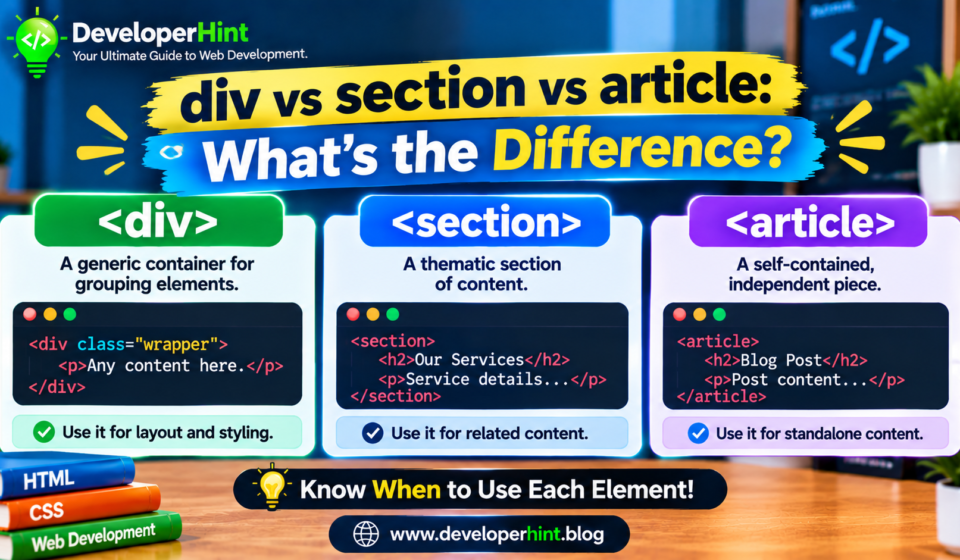
A div has no meaning, it is a generic container you use when you need a wrapper for styling or scripting and nothing else fits.
A section groups content around a single theme, normally with its own heading.
An article holds a self-contained piece of content that would still make sense if you lifted it out of the page and dropped it somewhere else, like a blog post, a news story, or a comment.
The div element
The div is the oldest and most flexible of the three, it carries no semantic meaning at all, Browsers and assistive technology treat it as a neutral box, that makes it the right choice when your only reason for a wrapper is presentation, such as a grid container, a flex row, or a spot to hang a class name so JavaScript can find it.
<div class="card-grid">
  <div class="card">...</div>
  <div class="card">...</div>
</div>
Nothing is wrong with a div, the trouble starts when you use it for everything, so that a whole page becomes a pile of nested divs with class names doing all the explaining, that is sometimes called div soup, and it gives assistive tools nothing to work with.
The section element
A section represents a thematic grouping of content, the usual rule is that it should have a heading that describes what is inside, think of the chapters of a long guide, or the “Features”, “Pricing”, and “FAQ” blocks on a landing page.
<section>
  <h2>Pricing</h2>
  <p>Plans start at...</p>
</section>
A common beginner mistake is to treat section as a fancier div, if the only reason you are adding the wrapper is to style it, use a div, A section should earn its place by being a real part of the content with its own topic.
The article element
An article is a complete, standalone composition, the test is whether it could be syndicated or reused independently, for example in an RSS feed, a social share card, or a different page, Blog posts, news stories, forum posts, product cards, and user comments all pass that test.
<article>
  <h2>How to Center a Div</h2>
  <p>Posted on November 12, 2026</p>
  <p>Centering has always been one of CSS's favorite jokes...</p>
</article>
How they nest together
These elements are designed to be combined, an article can contain several sections, such as the chapters of a long post, a section can contain articles, like a “Latest posts” section on a homepage holding a list of posts.
Comments are a good example of nesting in the other direction, since each comment is its own article placed inside the article for the post it responds to.
A div can sit anywhere in this tree when you need a styling wrapper.
<main>
  <article>
    <h1>Post title</h1>

    <section>
      <h2>Introduction</h2>
      <p>...</p>
    </section>

    <section>
      <h2>Main idea</h2>
      <div class="code-example">...</div>
    </section>

    <section>
      <h2>Comments</h2>
      <article><p>First comment...</p></article>
    </section>
  </article>
</main>
div vs section vs article
| Element | What it means | Heading expected? | Best for |
|---|---|---|---|
| div | Nothing, it is a generic container | No | Layout wrappers, styling hooks, and scripting targets |
| section | A thematic group of related content | Yes, in most cases | Distinct parts of a page or chapters of a long article |
| article | A self-contained, reusable piece of content | Usually, yes | Blog posts, news stories, comments, and product cards |
What they change in the browser
By default, very little, all three are block-level elements, so they stack vertically and fill the width of their parent, none of them adds default margins or special styling.
You would style them with CSS exactly the same way, the differences show up in accessibility tools and in how other software reads your page, not in how the page looks.
Accessibility and landmarks
This is where the choice matters most in practice, a section only becomes a navigable landmark region for screen reader users if you give it an accessible name, for example with aria-labelledby pointing at its heading or an aria-label.
Without a name, it is treated like any other generic grouping.
An article has its own role, so assistive technology can recognize it as a standalone piece of content.
A div carries no role.
<section aria-labelledby="pricing-heading">
  <h2 id="pricing-heading">Pricing</h2>
  <p>Plans start at...</p>
</section>
There is one more thing worth knowing about headings, older HTML5 drafts described a “document outline” in which headings restart at h1 inside every section, Browsers never implemented it, so you should not rely on it, keep using the normal heading order with one h1 for the page and h2 and h3 below it, regardless of how many sections or articles you use.
Ask yourself three questions, in this order, Does the content stand on its own and make sense if it were pulled out and published somewhere else? Use article.
If not, is it a themed part of a larger piece, the kind of thing you would give a heading to? Use section.
If it is neither, and you only need a wrapper for layout or scripting, use div, if one of the other semantic elements fits better, such as nav, aside, header, footer, or main, use that instead of any of these three.
Common mistakes to avoid
Using section as a general-purpose wrapper is the most common mistake, followed closely by sections with no heading at all, wrapping every small snippet in an article is another, since not everything needs to be independently reusable, and piling up nested divs where a single semantic element would do makes the page harder to read and harder to debug.
Do not agonize over edge cases, though. Choosing a div in a doubtful case is perfectly fine, and a slightly imperfect section is better than a page with no structure at all.
Use article for blog entries, news items, user comments, and product listings in a feed.
Use section for the labeled blocks of a landing page or the chapters of a long tutorial.
Use div for the invisible plumbing: flex and grid containers, centering wrappers, and anything your JavaScript needs to grab.
If you are building a WordPress theme, you will see this pattern constantly, with each post in a loop wrapped in an article and the surrounding page broken into sections and divs.
Discover more from Developer Hint
Subscribe to get the latest posts sent to your email.
Content Disclosure
This content was created with the assistance of AI tools and thoroughly reviewed, fact-checked, and refined by a human editor to ensure accuracy, clarity, and usefulness for readers.Advertisements