
Picking a hosting provider might not feel like the most exciting decision, but it’s one that affects everything — how fast your site loads, how often it goes down, and how much you’ll actually pay once the introductory offer expires.
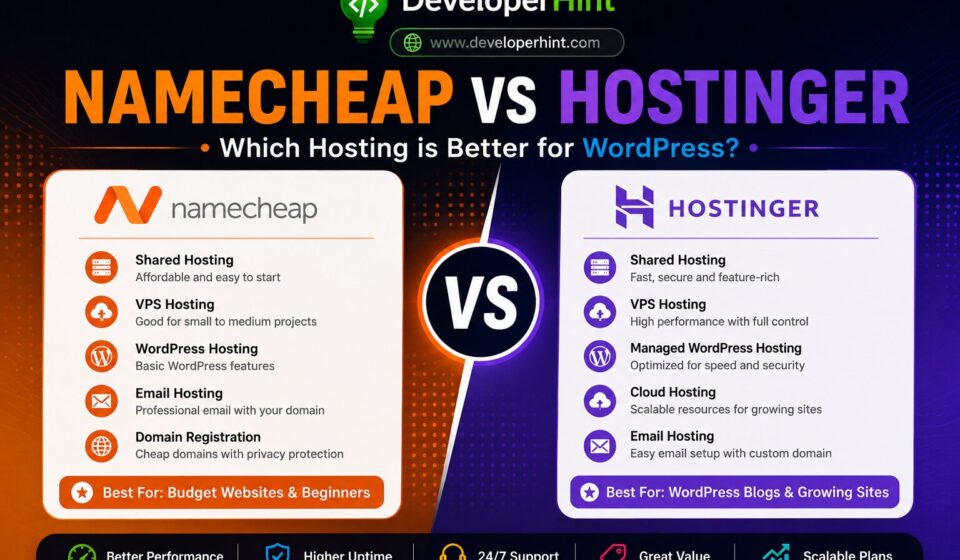
Namecheap and Hostinger are two of the most popular budget-friendly options out there, and they’re often compared side by side because they target a similar audience: people who want solid hosting without spending a fortune. Both offer shared hosting, VPS hosting, WordPress plans, domain registration, and email hosting. But there are real differences once you look past the price tags.
This guide breaks down shared hosting, VPS hosting, WordPress plans, performance, pricing, support, uptime, and the dashboard experience — so you can actually decide which one makes more sense for your website.
Quick Comparison
| Feature | Namecheap | Hostinger |
|---|---|---|
| Starting Price | From ~$1.98/month | From ~$1.99/month |
| Performance | Decent for small sites | Faster overall |
| Uptime | ~99.93% (tested) | ~100% (tested) |
| Dashboard | cPanel | hPanel (custom) |
| Beginner Friendly | Yes | Yes |
| WordPress Optimization | Basic | More optimized |
| LiteSpeed Servers | No (most plans use Apache) | Yes |
| NVMe Storage | No | Yes |
| WordPress Managed Plans | From $9.88/month | From $2.99/month |
| VPS Hosting | From $6.88/month | From $4.99/month |
| Best For | Budget sites, domain registration | WordPress blogs, growing sites |
Shared Hosting
Shared hosting is the starting point for most websites — it’s affordable, easy to set up, and works fine for sites that don’t get massive traffic.
Namecheap shared hosting is about as cheap as it gets, with introductory prices starting around $1.98/month. It’s a reasonable choice for small blogs, portfolio sites, or simple projects where you just need something online without overthinking it. The trade-off is that most Namecheap shared plans still run on Apache servers, which means they’re missing the speed advantages that come with newer server technology. Independent testing has recorded Namecheap’s uptime at around 99.93%, which is good but falls short of its own advertised guarantee.
Hostinger shared hosting starts at a similar price point (around $1.99/month) but comes with a meaningfully different setup. Most plans use LiteSpeed web servers combined with NVMe SSD storage — two things that make a real difference for loading times, especially on WordPress sites. In 180-day hands-on testing by WebsitePlanet, Hostinger delivered 100% uptime and loading times around 47% faster than Namecheap’s. For a WordPress blog where speed matters for both user experience and SEO, that gap is hard to ignore.
Hostinger offers fast WordPress hosting with LiteSpeed servers, free SSL, and solid performance for blogs and developer websites. You can also get an extra 20% discount using this link below.
Get Hostinger with Extra 20% OFF →VPS Hosting
VPS hosting gives you dedicated resources and root access, which is useful when a shared environment can no longer handle your traffic or when you want more control over the server.
Namecheap VPS plans start from $6.88/month and offer flexible configurations with root access. It’s a workable option for developers who know their way around a server and don’t need hand-holding. That said, the infrastructure isn’t considered best-in-class compared to providers that have invested more heavily in modern cloud architecture.
Hostinger VPS plans start from $4.99/month — notably cheaper than Namecheap for similar specs. The plans come with better management tools, which makes the jump from shared hosting to VPS less intimidating for people who aren’t sys-admins. If you’re scaling up a WordPress site and want a smoother transition, Hostinger handles it more gracefully.
WordPress Hosting
This is where the gap between the two providers is most obvious, especially on price.
Namecheap WordPress hosting covers the basics — easy installation, free SSL, and decent support for smaller WordPress sites. But managed WordPress plans start at $9.88/month and limit you to one site per plan, which feels steep when you compare it to what competitors offer at the same price.
Hostinger WordPress hosting starts at $2.99/month for managed plans, which is a significant difference. The plans include LiteSpeed Cache support, automatic updates, and a WordPress-optimized environment out of the box. Hostinger is also officially recommended by WordPress.org, which is a meaningful endorsement. For anyone running a WordPress blog or e-commerce site, Hostinger simply offers more for less money here.
Performance and Speed
Speed affects how search engines rank your site and whether visitors stick around or leave. Slow sites bleed traffic.
Namecheap performance is acceptable for small, low-traffic websites, but its infrastructure hasn’t kept up with the competition. Running Apache on most shared plans, without LiteSpeed or NVMe storage, means it’s inherently slower at handling WordPress sites under load.
Hostinger’s investment in LiteSpeed servers and NVMe SSD storage produces tangible results. Independent testing consistently shows Hostinger achieving 100% uptime while Namecheap sits at around 99.93%. In practical terms, that’s the difference between a site that’s reliably fast and one that occasionally has slow patches. For WordPress specifically — with its database queries and plugin overhead — the LiteSpeed advantage is more noticeable.
Dashboard Experience
Namecheap uses cPanel, the industry-standard hosting control panel. If you’ve used hosting before, you probably already know it. It’s functional and widely documented, but it’s showing its age — the interface feels cluttered compared to what newer panels offer.
Hostinger uses hPanel, its own custom-built dashboard. It’s cleaner, better organized, and genuinely easier to navigate if you’re new to hosting. Most tasks — spinning up a site, managing domains, setting up email — take fewer clicks than they do in cPanel. For beginners especially, hPanel is a more welcoming experience.
Customer Support
Both providers offer 24/7 live chat, but there’s a nuance worth knowing.
Namecheap actually has faster initial response time, live chat replies average under a minute. The support team handles common issues well and there’s solid documentation available. Where it sometimes struggles is with more technical WordPress problems.
Hostinger’s average response time is around 3–5 minutes, so you might wait a little longer to connect. But once you’re in a conversation, the quality of guidance tends to be better for WordPress-specific issues and more technical questions. Support is also available in 8+ languages.
Neither provider is going to leave you completely stranded, but the quality of the answer matters as much as the speed of the reply.
Pricing — The Renewal Trap
Both Hostinger and Namecheap use the same playbook: low introductory prices that increase at renewal. This is standard across the industry, but it’s worth knowing before you sign up.
Namecheap’s short-term pricing looks slightly cheaper on paper, but once you factor in renewal rates, the absence of built-in tools that Hostinger includes (like free domain, backups, and CDN), and the additional plugins you might need to match Hostinger’s performance, the real cost often evens out or tips in Hostinger’s favor over time.
Choose Namecheap if:
- You want the absolute cheapest option for a simple site
- You’re mainly after domain registration (Namecheap is genuinely excellent at this)
- cPanel familiarity matters to you
- Performance isn’t a priority
Choose Hostinger if:
- You’re building or growing a WordPress site
- Uptime and loading speed matter
- You want managed WordPress without paying a premium
- you want LiteSpeed servers and free SSL.
- You prefer a modern, easier-to-navigate dashboard
- You expect your site to grow over time
Final Verdict
Namecheap is a solid option in one specific area: domain registration. For that, it’s consistently ranked among the best globally, with .com domains starting around $8.88/year and free lifetime WHOIS privacy.
For hosting though — especially WordPress hosting — Hostinger wins on most of the metrics that actually affect your site’s performance. Faster servers, better uptime, a more modern dashboard, cheaper WordPress plans, and infrastructure built for how the web works today.
The price difference between the two is often smaller than it looks once you account for what’s included.
If you’re running a serious WordPress site or expecting to grow, Hostinger is the stronger long-term bet. If you just need a basic site up for minimal cost and don’t mind slower speeds, Namecheap will get the job done.
Discover more from Developer Hint
Subscribe to get the latest posts sent to your email.
Content Disclosure
This content was created with the assistance of AI tools and thoroughly reviewed, fact-checked, and refined by a human editor to ensure accuracy, clarity, and usefulness for readers.Advertisements